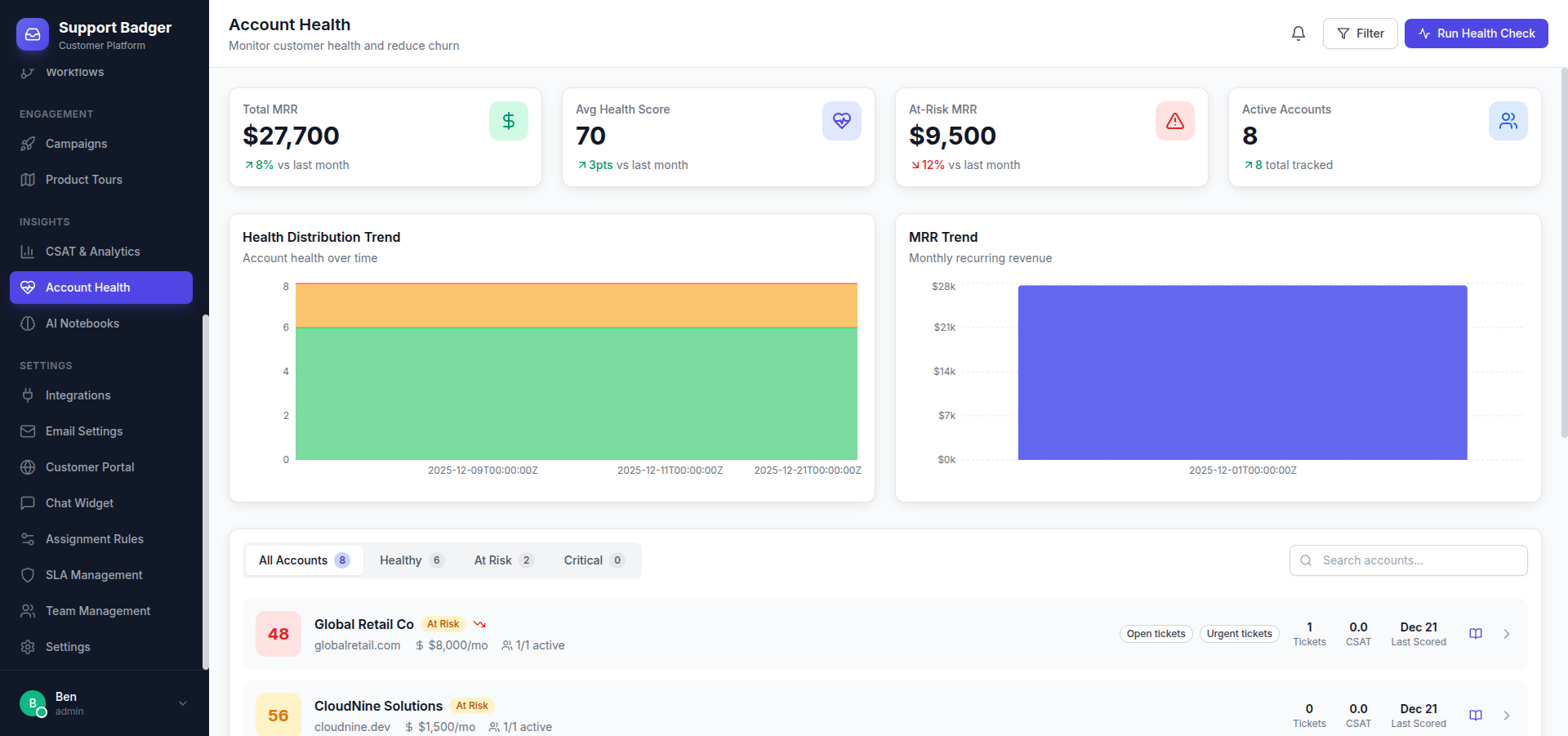
Account Health helps you identify which customers are thriving and which need attention. Powered by AI analysis of support interactions, satisfaction scores, and engagement patterns.
Health Scores
Every company receives a health score:
| Score | Range | Meaning |
|---|---|---|
| Excellent | 90-100 | Highly satisfied, engaged customer |
| Good | 70-89 | Generally positive relationship |
| Fair | 50-69 | Some concerns, monitor closely |
| At Risk | 30-49 | Significant issues, intervention needed |
| Critical | 0-29 | High churn risk, immediate action required |
Health Factors
Scores are calculated from multiple signals:
Support Metrics
- Ticket Volume - Unusually high volume can indicate problems
- Resolution Time - How quickly we resolve their issues
- Repeat Issues - Same problems recurring
- Escalations - Frequency of escalated tickets
Satisfaction Signals
- CSAT Scores - Direct feedback on interactions
- Sentiment Analysis - Tone of messages (positive/negative)
- Response Rate - How often they respond to surveys
Engagement Patterns
- Contact Frequency - How often they reach out
- Channel Usage - Using all available channels
- Feature Questions - Asking about advanced features (good sign)
Account Health Dashboard
Access via Analytics → Account Health:
- Overview - Distribution of health scores
- At-Risk List - Accounts needing attention
- Trends - Health changes over time
- Alerts - Recent score changes
Alerts
Get notified when accounts need attention:
Alert Types
- Score Drop - Significant decrease in health score
- At Risk - Account moves to At Risk or Critical
- Negative CSAT - Poor satisfaction rating received
- Escalation - Issue escalated by customer
Notification Channels
- Email to account owner
- Slack channel notification
- In-app notification
Taking Action
For At-Risk Accounts
- Review the AI Notebook for context
- Identify root causes from support history
- Schedule proactive outreach
- Loop in customer success team
- Track improvement over time
For Healthy Accounts
- Identify expansion opportunities
- Request testimonials or case studies
- Invite to beta programs
Integrations
Health data syncs with:
- Salesforce - Update account health field
- HubSpot - Trigger workflows on score changes
- Slack - Post alerts to channels
Learn more about CRM integrations →
Configuration
Customize health scoring in Settings → Account Health:
- Adjust factor weights
- Set alert thresholds
- Configure notification recipients
- Exclude certain accounts (e.g., free tier)
Requirements
- Pro or Enterprise plan
- Bramble AI addon (recommended)
- At least 30 days of support data